Webinar Landing Page: The Sections That Get People to Register
A webinar landing page that gets registrations names one specific problem in the visitor’s own words, says exactly what they will leave the session with, shows who it’s for and who it isn’t, and asks for as little as possible in the form. Write it from a clear picture of your customer, not from a list of your services.
This guide is for agency owners, consultants and business owners running their own webinars, from beginner to expert. You don’t need a designer or a copywriter.
This guide is part of the free course AI Webinar Landing Page Creator. The free AI Webinar Landing Page Creator course shows the whole workflow for a webinar landing page, from teaching Claude your business to writing the final copy. It’s free, with no card.
Start the free course →Why most webinar pages don’t get registrations
Most webinar pages are written about the webinar. A title, a date, the host’s bio and a list of topics. The visitor has to work out for themselves why any of it matters to them, and most won’t bother.
When AI writes the page, the problem is usually different. The AI doesn’t understand the business it is writing for. Ask for “a webinar landing page about bookkeeping” and you get an average page for an average business, with claims you can’t back. Rewording the prompt doesn’t fix missing information.
The fix is an order of work:
- Give the AI your business information first.
- Build customer profiles from that information.
- Only then write the page, for one of those profiles.
A tool sold as an AI landing page generator can produce a page in seconds, but the page is only as specific as what the AI knows about you. Doing the first two steps once means every future webinar page starts from the same knowledge instead of from scratch.
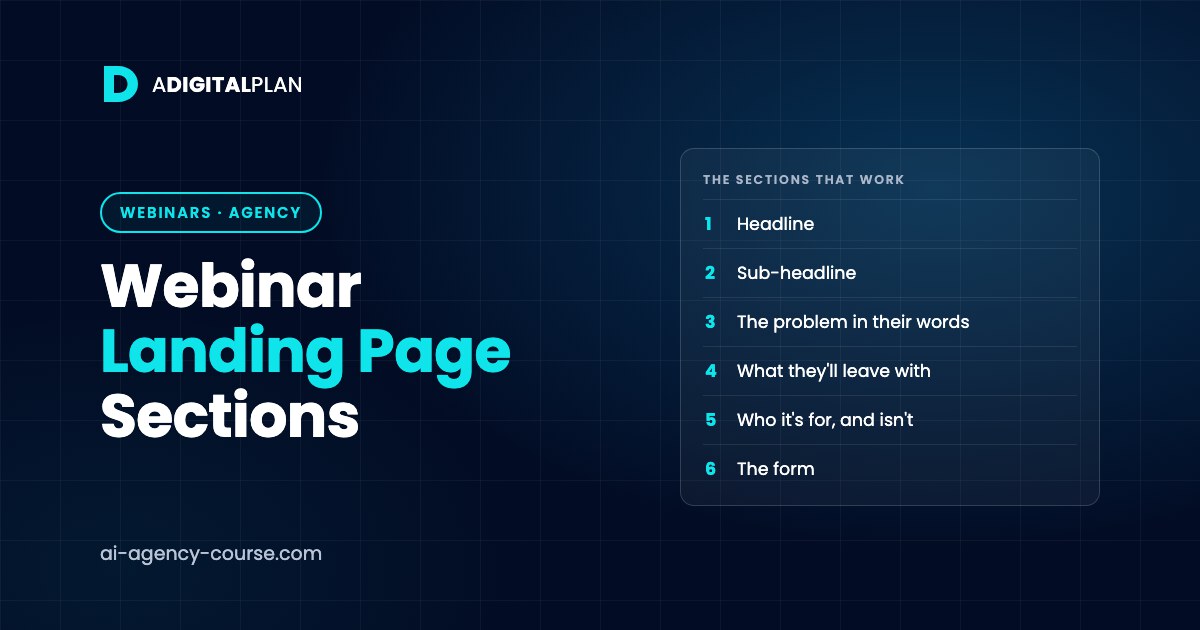
The sections of a webinar landing page that work
Put them in this order:
- Headline. The result they want or the problem they have, in plain words. Not the webinar’s title.
- Sub-headline. Who it’s for, the format, the length, and the date and time with the time zone.
- The problem, in their words. Two or three sentences that show you understand what they’re dealing with.
- What they’ll leave with. Three to five specific takeaways. “A checklist for your month-end” beats “insights into finance”.
- Who it’s for, and who it isn’t. Saying who should skip it makes the right people more sure it’s for them.
- Who’s running it. A few lines on why you’re qualified, using only real proof. No invented numbers or testimonials.
- The form. Name and email. Every extra field is another reason to leave.
- A short FAQ and a second button. Is it recorded? How long is it? Will there be an offer at the end? Answer honestly.
Leave out fake countdown timers and seat limits that aren’t real. Visitors have seen them before.
How to build it with Claude, step by step
- Build a knowledge base. Write down what you sell, how you position it, who your customers are, and their goals and frustrations. Save it in a Claude Project so every chat starts briefed.
- Generate customer profiles. Ask Claude to build profiles from that knowledge: goals, pain points, what makes them act, objections and the phrases they use.
- Pick one profile for this webinar. A page written for everyone persuades no one.
- Write the page section by section against that profile, using the order above.
- Check every claim against your knowledge base. Remove anything that isn’t true or that you can’t show.
- Reuse it. Next webinar, keep the knowledge base and profiles and only rewrite the page.
Two prompts to start with. Square brackets mark what only you can fill in.
Read the business information in this Project. Build two customer profiles for people who would register for a webinar on [webinar topic].

For each profile give: their situation, the goal they want, the frustrations stopping them, what would make them register now, the objections they would have, and the phrases they would use to describe the problem.

Use only what the business information supports. Where you are guessing, say so.
Write a webinar landing page for [webinar title] on [date, time and time zone], aimed at [chosen profile].

Use these sections in order: headline, sub-headline, the problem in their words, four things they will leave with, who it is for and who it is not for, about the host, registration form (name and email only), a short FAQ.

Do not invent statistics, testimonials or results. Mark any proof I need to supply as [ADD PROOF].
Worked example (fictional demo)
Brightline Bookkeeping is a fictional demo business, not a real company. It runs a webinar for independent café owners.
The first draft headline was “Bookkeeping Essentials Webinar”. After building a café owner profile, the headline became “Know what your café made last month, before the next one is half over”. The problem section uses a phrase straight from the profile: “I only find out how the month went when the accountant tells me, weeks later.”
The takeaways are concrete: a simple month-end checklist, the three figures to check every Monday, and how to split card takings from cash. The “who it isn’t for” line reads: “If you already have a finance person doing this weekly, you won’t need this.” The form asks for name and email only. The FAQ says it’s recorded, lasts 45 minutes, and ends with a short mention of Brightline’s monthly service.
Common mistakes
- Writing the page before you know who it’s for.
- Using the webinar title as the headline.
- Listing topics instead of outcomes.
- Asking for phone number, company size and job title on the form.
- Letting AI add statistics or testimonials you don’t have.
- Starting from a blank chat for every new webinar.
Build your webinar page with the free course
The landing page is one part of a bigger system. If you want to see how it fits into an ads, webinar and strategy call funnel, that guide covers the rest of it.
The free AI Webinar Landing Page Creator course is a short, step-by-step lesson that works through the knowledge base, then the customer profiles, then the page itself, with the prompts included. You finish with Claude set up on your business, customer profiles you can reuse for ads and emails, and a registration page ready for your webinar funnel. It’s free, with no card and lifetime access.
FAQ
How long should a webinar landing page be?
Long enough to cover the eight sections above, and no longer. For most webinars that’s one scroll on a laptop and two or three on a phone.
Do I need a special page builder?
No. Any page builder or website editor you already use will do. The work is in the copy, and that’s what the course and the prompts focus on.
Should the page say whether the webinar is recorded?
Yes. People who can’t make the time will still register if they know a recording is coming, and being upfront about it builds trust before they arrive.